

Data Leak Node
When you’re investigating data breaches or tracking compromised information, Data Leak Nodes are where you document and organize breach details. They’re like digital incident reports that store breach information, leaked data fields, verification status, and investigation metadata to help you understand the scope and impact of security incidents.What goes in a Data Leak Node?
Data Leak Nodes contain comprehensive breach documentation:- Breach Information - Breach name (LinkedIn 2021, Facebook 2019), breach date, verification status
- Leaked Data - Structured fields of compromised information (emails, usernames, passwords, personal details)
- Verification Status - Verified, unverified, or false breach classifications with visual indicators
- Investigation Metadata - Source databases (haveibeenpwned, dehashed, intelx), confidence levels, analysis notes
- Timeline Context - When the breach occurred and when it was discovered
When you’ll use these
Data Leak Nodes are essential for:Breach investigations
Documenting security incidents and tracking which personal information was compromised in data breaches.
Credential matching
Organizing leaked credentials and passwords to try matching with another breach.
How to document a data breach
1
Create the data leak node
Grab the Data Leak node from dock and click where you want it on your graph. This represents a documented security breach.
2
Set breach details
Document the core breach information:
- Breach Name - Descriptive identifier (LinkedIn, Facebook, etc.)
- Breach Date - When the security incident occurred
- Verification Status - Choose from Verified, Unverified, or False
3
Add leaked data fields
Input the specific information that was compromised:
- Personal Data - Names, email addresses, phone numbers
- Account Information - Usernames, passwords, security questions
- Additional Details - Addresses, dates of birth, financial information
4
Document investigation metadata
Add context for your analysis:
- Source - Database or service used (haveibeenpwned, dehashed, intelx)
- Confidence Level - High, Medium, or Low based on source reliability
- Notes - Additional observations and breach impact analysis
Connecting data leaks to your investigation
Data Leak Nodes become powerful when you link them to other investigation elements:From breaches to affected individuals
Identity mapping: Convert leaked credentials to:- Identifier nodes for compromised email addresses and usernames
- Organization nodes when business accounts are affected
- Person profiles when personal information is leaked
- Multiple data leak nodes showing repeat victimization
- Timeline analysis using breach dates and discovery dates
- Geographic patterns when location data is compromised
Investigation workflow patterns
Credential breach tracking
Start with known compromised credentials, create Data Leak nodes for each breach, then investigate which accounts need protection.
Corporate security assessment
Document all breaches affecting company email domains, assess business impact, and prioritize response actions.
Personal identity monitoring
Track breaches containing specific personal information to understand individual privacy exposure and identity theft risks.
Example: MySpace breach documentation
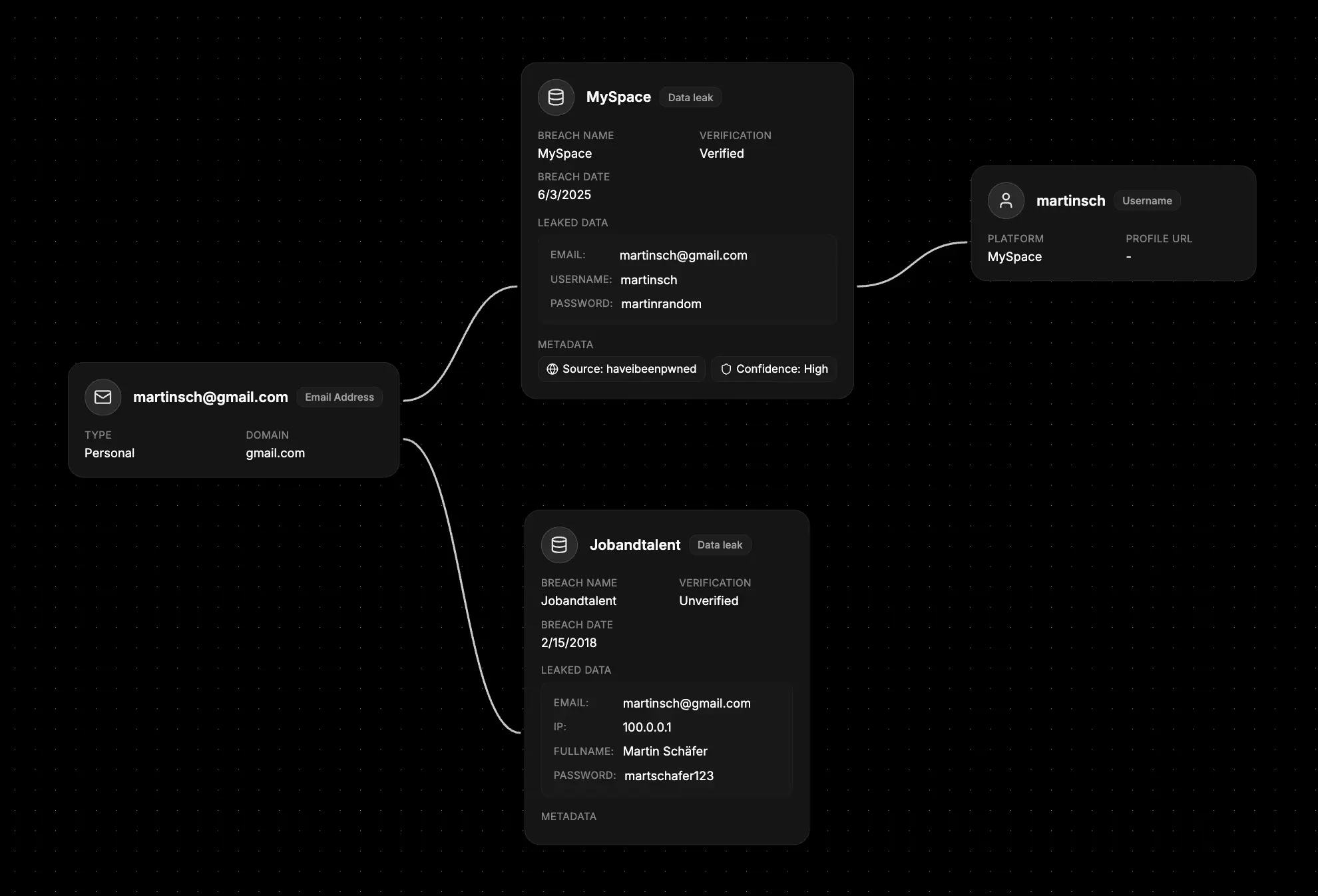
- Set the breach context - Name: “MySpace”, Date: “2008-04-06”, Status: “Verified”
- Add compromised data - Email addresses, full names, professional titles, company information
- Include verification details - Source: “haveibeenpwned”, Confidence: “High”
- Connect to investigation - Link to affected Identifier nodes and Organization nodes
- Document impact - Use notes to track business implications and response actions
What else to connect
Data Leak Nodes work seamlessly with:- Identifier - Compromised email addresses, usernames, and personal information
- Organization - Companies and services affected by the breach
- Stealer Logs - Malware infections that may have contributed to the breach
- Network - Compromised domains, servers, and infrastructure involved
- File - Breach reports, impact assessments, and security documentation
- Event - Timeline of breach discovery, disclosure, and response activities
- Notes - Investigation findings, response plans, and security recommendations