

WHOIS Node
When you need to discover who owns and operates digital infrastructure, WHOIS Nodes are your intelligence goldmine. They store comprehensive registration records that reveal the people, organizations, and contact details behind domains, IP addresses, and network operations.What goes in a WHOIS Node?
WHOIS Nodes adapt to three types of registration intelligence:- Domain WHOIS - Registration details, registrar info, expiration dates, nameservers, contact records
- IP WHOIS - Network ranges, hosting organizations, geographic locations, abuse contacts
- ASN WHOIS - Network operators, announced prefixes, peering relationships, operational contacts
- Contact Intelligence - Technical, administrative, and registrant contact information
- Investigation Metadata - Source tracking, confidence levels, research notes
When you’ll use these
WHOIS Nodes are essential for:Domain investigations
Uncovering domain ownership, registration history, and contact information for website investigations.
Network intelligence
Mapping IP address ownership, hosting providers, and network infrastructure relationships.
Contact discovery
Extracting technical, administrative, and registrant contacts for further investigation.
Infrastructure mapping
Understanding ASN operations, peering relationships, and network topology.
How to add WHOIS intelligence
1
Add WHOIS node
Grab the WHOIS node from dock and click where you want it on your graph.
2
Choose your WHOIS type
- Domain - For website and domain investigations
- IP/Subnet - For server and hosting research
- ASN - For network operator intelligence
3
Enter the target identifier
Input the domain, IP address, or ASN number. The system will:
- Auto-detect type - Recognize whether it’s domain, IP, or ASN data
- Validate format - Ensure proper syntax for each type
- Organize fields - Display relevant registration fields
4
Add registration details
Fill in the WHOIS information you’ve gathered:
- Domain: Registrar, registration/expiry dates, nameservers
- IP: Network ranges, organizations, geographic data
- ASN: Network operators, announced prefixes, peering info
5
Extract contact intelligence
Add contact information for different roles:
- Technical contacts - IT personnel and network administrators
- Administrative contacts - Business and operational contacts
- Registrant contacts - Domain owners and responsible parties
Connecting WHOIS data to your investigation
The real power comes from linking WHOIS intelligence to other parts of your investigation:People become searchable networks
Contact extraction: Click any contact to:- Create Identifier nodes for technical and administrative contacts
- Link registrant information to people in your investigation
- Map organizational relationships through shared contacts
- Organization nodes for registrars and hosting companies
- Network nodes for nameserver infrastructure
- Map nodes for geographic registration data
- Organization nodes for ISPs and hosting providers
- Identifier nodes for abuse and technical contacts
- Network nodes for IP ranges and ASN relationships
Investigation workflow patterns
Domain deep-dive
Start with a Domain WHOIS node, extract registrant and technical contacts, then investigate the registrar organization and nameserver infrastructure.
Infrastructure tracing
Begin with IP WHOIS for hosting details, then trace to ASN WHOIS for network operators, building a complete hosting relationship map.
Contact intelligence
Use WHOIS contact data as a starting point to build comprehensive profiles of technical personnel and organizational relationships.
Example: Complete domain investigation
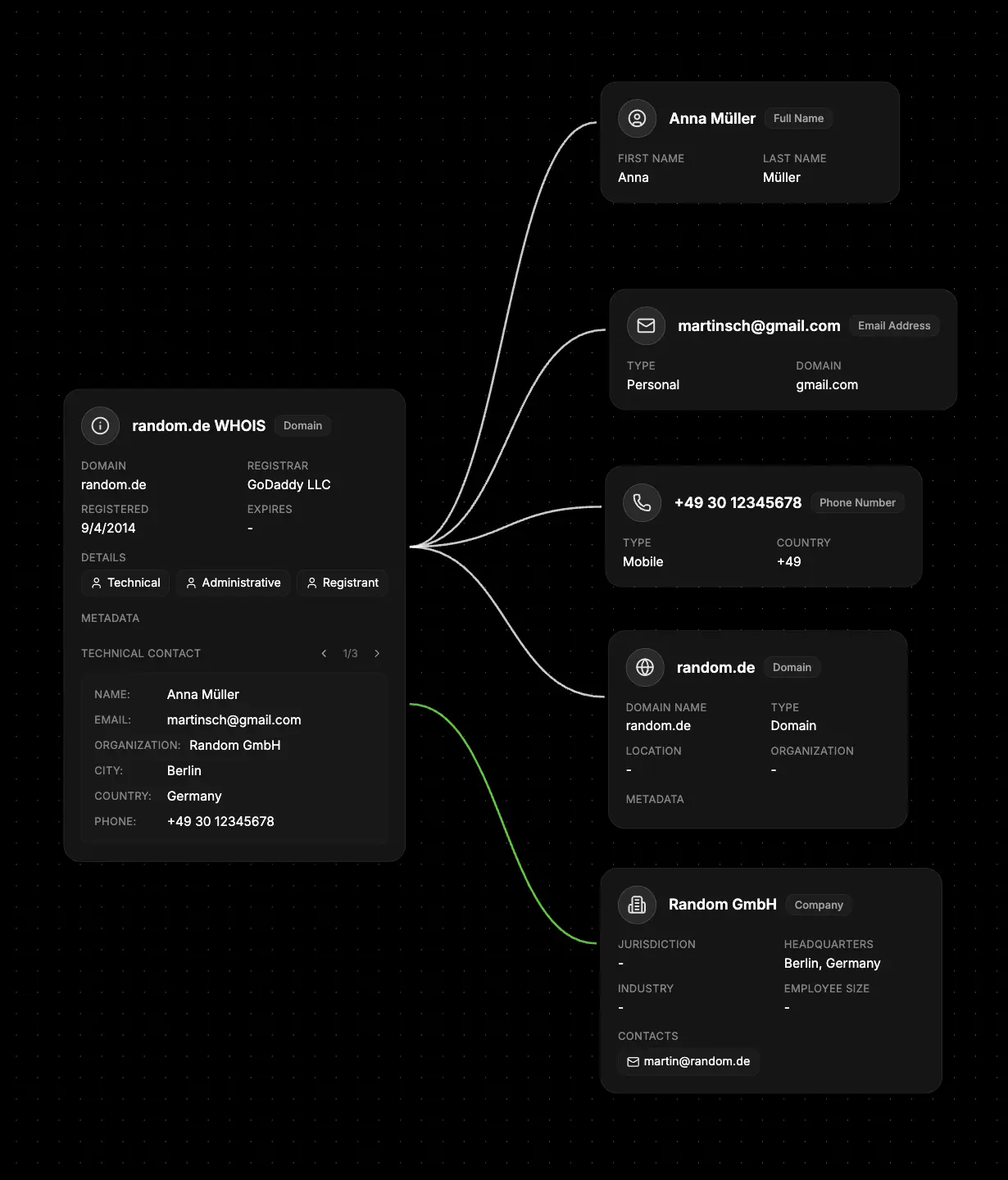
- Create Domain WHOIS - Add registration details, dates, and registrar information
- Extract contacts - Convert technical, administrative, and registrant contacts to Identifier nodes
- Map infrastructure - Link nameservers to Network nodes for hosting relationships
- Connect organizations - Link registrar and hosting companies to Organization nodes
- Cross-reference - Compare contacts across multiple WHOIS records for patterns
- Timeline events - Use registration and expiry dates for Event nodes
What else to connect
WHOIS Nodes work seamlessly with:- Network - Link to domains, IP addresses, and ASN infrastructure
- Identifier - Connect to technical, administrative, and registrant contacts
- Organization - Link to registrars, hosting companies, and network operators
- Map - Connect to geographic locations from WHOIS data
- Event - Timeline registration dates, expiry dates, and ownership changes
- File - Attach WHOIS records, historical data, and research documents
- Notes - Add analysis of registration patterns and intelligence observations