

Notes Node
When you need to add context, observations, or analysis notes to your investigation, Notes Nodes give you a simple sticky note that sits right on your graph. They’re perfect for jotting down thoughts, theories, or important details that don’t fit into the structured data fields of other nodes.What goes in a Notes Node?
Think of Notes Nodes as your investigation’s annotation layer:- Free-form text - Any observations, theories, or context about your case
- Simple formatting - Line breaks and basic text, no complex formatting needed
- Visual customization - Pick colors and fonts to organize by priority or case phase
- Timestamp tracking - See when notes were created and last modified
- Flexible sizing - Resize to fit short reminders or longer analysis
When you’ll use these
Analysis notes
Capture theories, patterns, or connections you’re seeing between different pieces of evidence.
Investigation reminders
Jot down follow-up tasks, questions to investigate, or important details to remember.
Case context
Explain why certain evidence matters or provide background that helps others understand the case.
Source annotations
Add credibility assessments, source reliability notes, or verification status for different leads.
How to add a note
1
Drop it on your graph
Grab the Notes tool from your sidebar and click where you want it on your graph.
2
Add your content
Double-click the note to start typing, or click the gear icon for the full options panel:
- Title - Brief label for what the note is about
- Content - Your observations, analysis, or investigation notes
3
Style it for priority
Pick colors and sizing to make important notes stand out:
- Background - Eight color presets (yellow, blue, green, pink, purple, orange, red, gray)
- Text color - High contrast options for readability
- Font size - 10-24px range with live preview
4
Resize for content
Drag the handles to fit your text—the note automatically scales fonts and spacing to stay readable.
Connecting notes to everything else
Notes work best when placed next to the evidence or entities they describe. Here’s how to use them effectively:Common investigation patterns
Evidence annotation
Place notes next to identifiers, organizations, or files to explain their significance or suspicious patterns.
Theory development
Use notes to document your working theories about how different pieces of evidence connect.
Investigation status
Track which leads have been verified, which need follow-up, and what questions remain unanswered.
Example: Location verification tracking
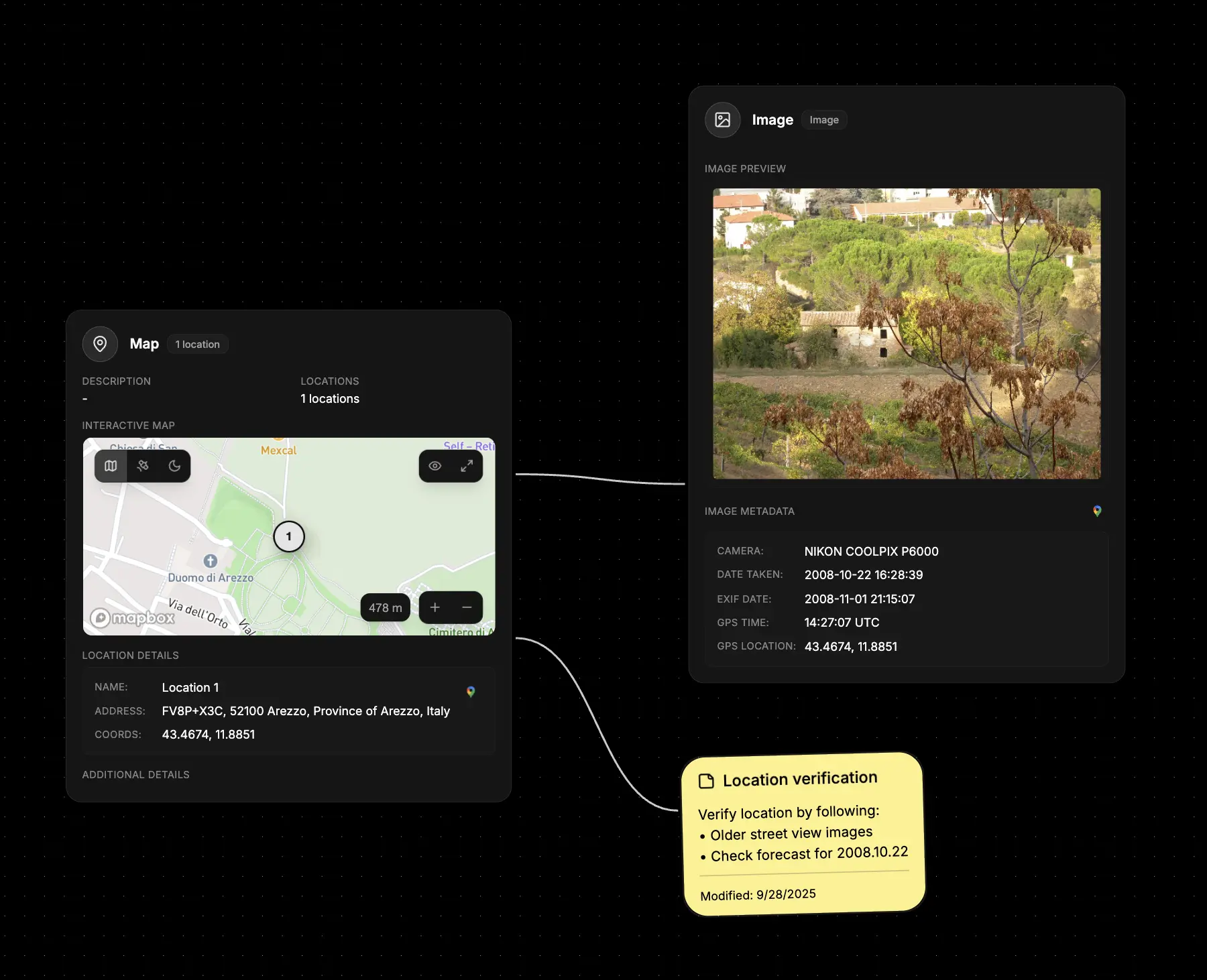
- Place near related evidence – Add notes next to map nodes or identifiers to track verification tasks.
- List verification steps – Use bullet points to outline what needs to be checked or confirmed.
- Track progress – Update the note as you complete each verification step or find new leads.
What else to connect
- Identifier – Link observations about specific people, usernames, or contact points.
- Organization – Track follow-up actions or strategy decisions tied to a company profile.
- Module – Summarize findings from reverse searches and highlight immediate next steps.
- Data Leak – Capture breach verification notes, remediation owners, and response timelines.
- Map – Annotate geographic leads with situational context or field intel.
- File – Reference supporting documents or transcripts you attached elsewhere in the investigation.