

Network Node
When you’re investigating digital infrastructure or tracking online assets, Network Nodes are where you store technical details about domains, IP addresses, and network ownership. They’re like digital maps that help you understand how websites, servers, and networks connect to each other.What goes in a Network Node?
Network Nodes adapt to different types of network information you’re tracking:- IP Addresses - Server locations, hosting details, geographic data
- Domain Names - Website addresses, DNS information, ownership details
- ASN Numbers - Autonomous system numbers, network operator information
- Organization Data - ISPs, hosting providers, network ownership
- Metadata - Source information, confidence levels, investigation notes
When you’ll use these
Network Nodes are essential when you’re:Website investigations
Tracking domain ownership, hosting providers, and technical infrastructure behind websites.
Server analysis
Mapping IP addresses to physical locations, hosting companies, and network operators.
Infrastructure mapping
Building network diagrams to show how different digital assets connect and relate to each other.
Digital forensics
Tracing online activity back to specific networks, providers, and geographic locations.
How to add network information
1
Choose your network type
Grab one of the Network nodes from your sidebar and click where you want it. Then select from:
- IP Address - For server and hosting investigations
- Domain Name - For website and DNS research
- ASN - For network operator and ISP tracking
2
Enter the network address
Type the network identifier (IP, domain, or ASN). The system will:
- Validate formats - Ensure proper IP, domain, or ASN syntax
- Display the address - Show it clearly in the node header
- Enable connections - Allow linking to other investigation nodes
3
Add organization details
Fill in what you know about the network:
- Location - City, country, or geographic region
- Organization - ISP, hosting provider, or network operator
- Source - Where you found this network information
4
Set investigation metadata
Add context for your investigation:
- Confidence Level - High, Medium, or Low based on source reliability
- Notes - Technical details, investigation context, or observations
Connecting network data to your investigation
Network Nodes become powerful when you link them to other parts of your investigation:Digital infrastructure mapping
Domain connections: Link domains to:- Company nodes for website ownership
- Identifier nodes for contact information
- Other domains on the same hosting infrastructure
- Geographic locations via Map nodes
- Hosting companies via Organization nodes
- Related IP ranges and network blocks
- Multiple IP ranges and hosting blocks
- Company ownership and business relationships
- Geographic presence and infrastructure
Investigation workflow patterns
Website deep-dive
Start with a Domain node, then research its IP address, hosting provider, and connect to Company nodes for the organizations involved.
Server investigation
Begin with an IP Address node, identify the hosting provider and location, then map related infrastructure and network blocks.
Network mapping
Use ASN nodes to understand network operators, then connect to their IP ranges, hosted domains, and business relationships.
Example: Mapping website infrastructure
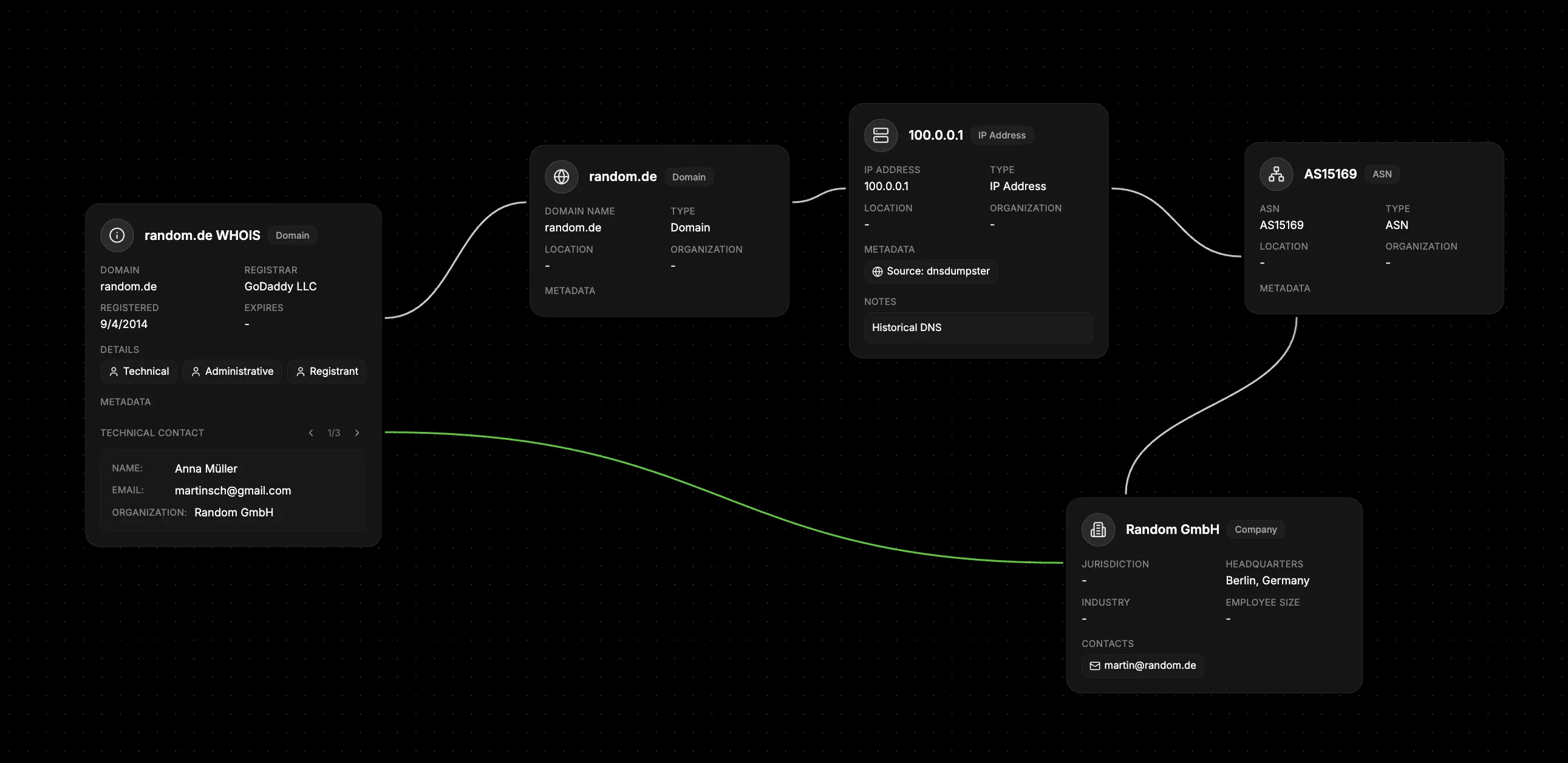
- Start with the domain - Create a Domain Name network node
- Research the infrastructure - Add IP addresses for servers and hosting
- Add WHOIS intelligence - Create linked WHOIS nodes for detailed ownership data
- Identify providers - Connect to Organization nodes for hosting companies
- Map locations - Link to Map nodes for server geographic locations
What else to connect
Network Nodes work seamlessly with:- WHOIS - Link to detailed registration and ownership data
- Organization - Connect to hosting companies, ISPs, and network operators
- Identifier - Link to domain contacts and technical personnel
- Map - Connect to server locations and geographic infrastructure
- File - Attach technical documents, DNS records, and research files
- Event - Timeline infrastructure changes and security incidents
- Notes - Add technical analysis and investigation observations