

Module Node
When you’ve conducted reverse searches and discovered accounts, profiles, or data linked to specific identifiers, Module Nodes are where you display and organize those findings. They’re like digital evidence cards that show what platforms and services are connected to an email, phone number, username, or name from your reverse search investigations.What goes in a Module Node?
Module Nodes store and display reverse search results with comprehensive data organization:- Search Information - Search type (email, phone, username, name), original query, platform/service name
- Found Data - Structured information discovered from the reverse search (usernames, display names, locations, etc.)
- Social Profiles - Connected social media accounts and platform-specific information
- Platforms - List of services where the identifier was found
- Investigation Metadata - Source tools used, confidence levels, analysis notes
When you’ll use these
Module Nodes are essential when you’re:Reverse search analysis
Displaying and organizing results from reverse searches conducted on platforms like Noimosiny.
Social media mapping
Showing discovered social media accounts and profiles linked to specific contact information.
Platform correlation
Connecting the same identifier across multiple platforms and services to build comprehensive profiles.
Evidence documentation
Organizing investigation findings with proper metadata and confidence tracking for case documentation.
How to add reverse search results
1
Create the module node
Grab the Module tool from your sidebar and click where you want it on your graph. This represents your reverse search findings.
2
Set the search parameters
Define what you searched for:
- Platform/Service - Name of the service (TikTok, GitHub, LinkedIn, etc.)
- Search Type - Choose from Email, Phone Number, Username, or Full Name
- Query - The actual identifier you searched ([email protected], @johndoe, etc.)
3
Add discovered data
Input the information found in your reverse search:
- Data Fields - Structured key-value pairs of discovered information
- Social Profiles - Platform-specific account details
- Connected Platforms - List of services where this identifier appears
4
Document investigation metadata
Add context for your findings:
- Source - Tool used (sherlock, theHarvester, Noimosiny, etc.)
- Confidence Level - High, Medium, or Low based on result reliability
- Notes - Additional observations and analysis
Connecting modules to your investigation
Module Nodes become powerful when you link them to other investigation elements:From reverse searches to identities
Social profile mapping: Convert discovered accounts to:- Identifier nodes for usernames and profile information
- Organization nodes when business accounts are discovered
- Person profiles when real names and personal information are found
- Multiple module nodes showing the same identifier across platforms
- Network nodes for associated domains and websites
- Geographic patterns when location data is discovered
Investigation workflow patterns
Email reverse search workflow
Start with an email address, search on Noimosiny, then create Module nodes for each platform where accounts were found (TikTok, Instagram, GitHub, etc.).
Username correlation tracking
Search the same username across multiple platforms, create Module nodes for each service, then connect them to build a comprehensive digital footprint.
Phone number investigation
Use reverse phone lookup results to create Module nodes for any social media or service accounts linked to that number.
Example: TikTok and AliExpress account discovery
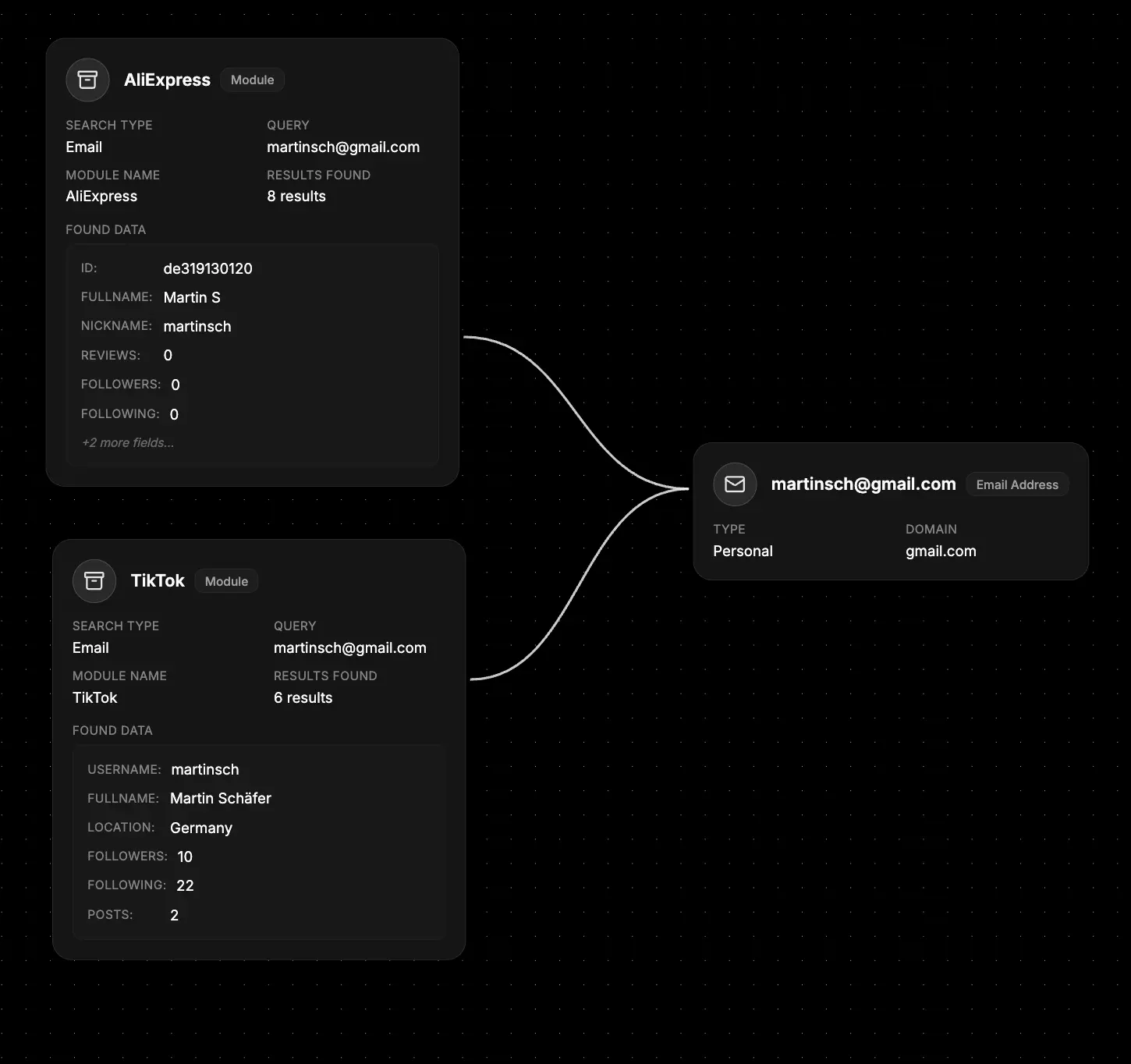
- Set the search context - Platform: “TikTok”, Type: “Email”, Query: “[email protected]”
- Add discovered profile data - Username, display name, follower count, bio information
- Include social profile details - Platform-specific information like TikTok user ID, verification status
- Document the source - Tool used NOIMOSINY, confidence level based on result accuracy
- Connect to broader investigation - Link to the person’s Identifier node and other social platforms
What else to connect
Module Nodes work seamlessly with:- Identifier - The original search terms and related contact information
- Organization - Companies and businesses discovered through the reverse search
- Network - Websites, domains, and infrastructure linked to found accounts
- File - Screenshots, reverse search reports, and evidence documentation
- Event - Timeline of account activities, creation dates, and investigation milestones
- Map - Geographic locations associated with discovered accounts
- Notes - Investigation observations, analysis, and case progress