

Identifier Node
When you’re investigating people or need to track specific contact details, Identifier Nodes are your go-to tool. They’re like digital ID cards that can store names, emails, phone numbers, or usernames - and they’re smart enough to search external databases and automatically parse information.What goes in an Identifier Node?
Identifier Nodes are flexible and adapt based on what type of identifier you’re tracking:- Full Names - First, last, middle names, plus date of birth
- Email Addresses - Email type (personal, work), domain extraction
- Phone Numbers - Phone type (mobile, home, work), country codes
- Usernames - Platform info (Twitter, Instagram), profile URLs
- Metadata - Source information, confidence levels, investigation notes
When you’ll use these
Identifier Nodes shine when you’re:People investigations
Tracking individuals across multiple platforms and connecting their digital footprints.
Contact verification
Verifying email addresses and phone numbers through external databases and OSINT sources.
Social media mapping
Connecting usernames across different platforms to build comprehensive profiles.
Communication tracking
Organizing contact methods and linking them to specific investigations or cases.
How to add an identifier
1
Choose your identifier type
Grab one of the Identifier nodes from your dock and click where you want it on your graph. Then select from:
- Full Name - For people and individuals
- Email Address - For email investigations
- Phone Number - For phone tracking
- Username - For social media accounts
2
Enter the primary value
Type the main identifier (name, email, phone, or username). The node will:
- Auto-parse names into first, last, and middle components
- Extract domains from email addresses automatically
- Check NOIMOSINY for previous reverse searches of this identifier
3
Add specific details
Depending on your identifier type, fill in:
- Names: Date of birth, middle names
- Emails: Email type (personal/work), domain verification
- Phones: Country codes, phone type (mobile/home)
- Usernames: Platform, profile URL
4
Set metadata
Add investigation context:
- Source - Where you found this identifier
- Confidence Level - High, Medium, or Low
- Notes - Any additional investigation details
Connecting identifiers to your investigation
The real power comes from linking identifiers to other parts of your investigation:People become searchable networks
Email connections: Enter any email to see if you’ve reverse searched it before:- Import accounts and profiles found in your previous reverse search
- Connect to company domains discovered in that search
- Link social media profiles from your reverse search results
- Import contact information from previous reverse searches
- Connect to business data found in those searches
- Link geographic information from reverse search results
- Connect platforms and profiles from previous reverse searches
- Link account information you’ve already discovered
- Build networks from your reverse search findings
Investigation workflow patterns
Starting with a name
Begin with a Full Name identifier, then add associated emails/phone numbers. If you’ve reverse searched those contacts on Noimosiny, import that data to create connected nodes.
Email investigation
Start with an Email identifier. If you’ve reverse searched this email on Noimosiny before, import that data to create Company nodes and Map nodes from your findings.
Social media deep-dive
Use Username identifiers to map social presence, connect to other platforms, and build comprehensive digital footprints.
Using Noimosiny search results
Identifier Nodes integrate with Noimosiny to check for previous reverse searches:What reverse search results contain
- Email addresses: Social media accounts, professional profiles, associated data
- Phone numbers: Contact information, geographic data, linked accounts
- Usernames: Platform profiles, cross-platform presence, account details
- Reverse search data: All information previously discovered for that identifier
Using search results
1
Type to search
As you enter identifiers, any previous reverse search results from Noimosiny appear automatically below the input field.
2
Review results
See if you’ve reverse searched this identifier before and preview the available data.
3
Import data
Click any result to import your previous reverse search data, creating connected nodes automatically.
4
Build networks
Importing reverse search results often creates multiple related nodes, building out networks from the data you previously found.
Example: Building a person profile
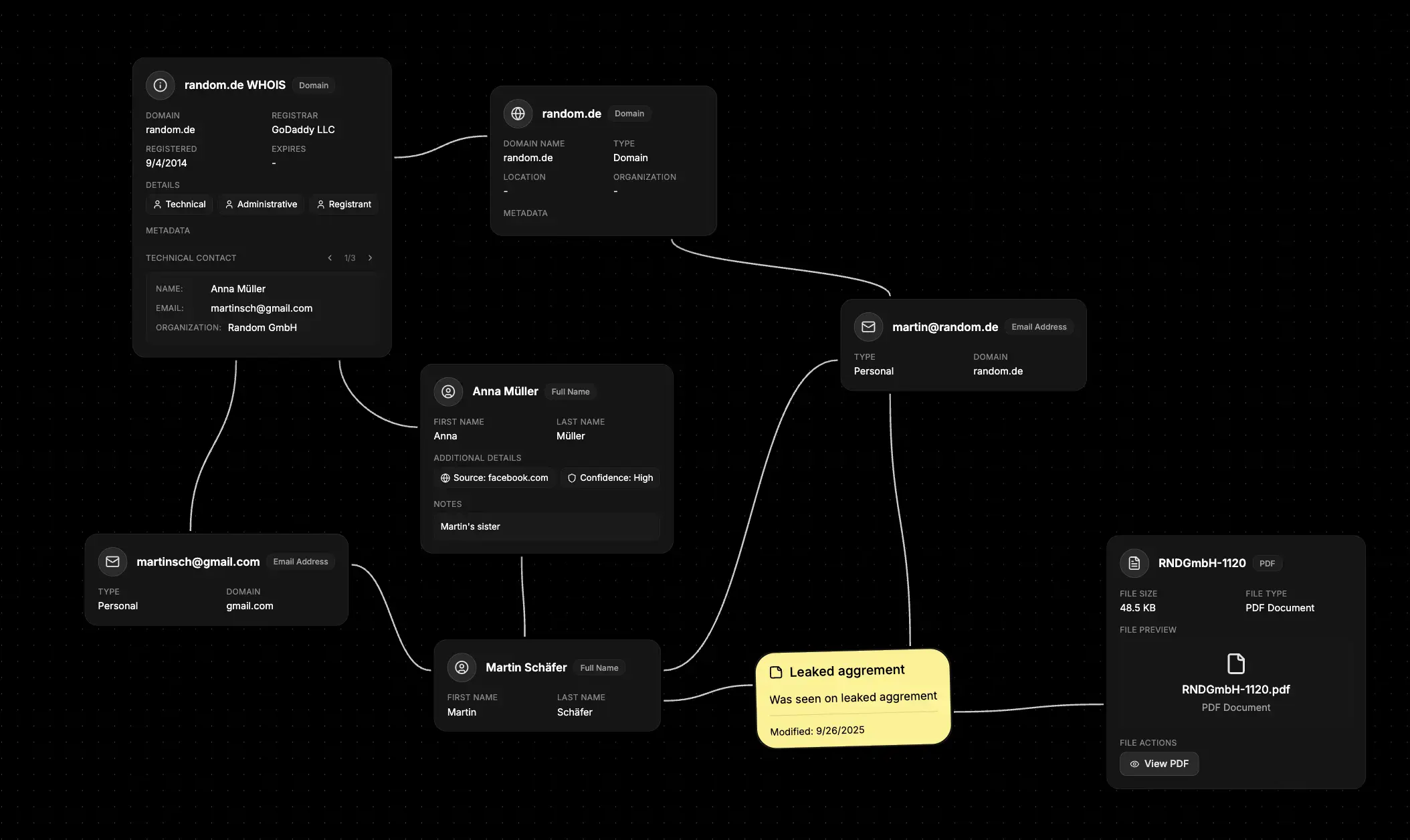
- Start with their name - Create a Full Name identifier
- Add contact information - Enter any known emails, phone numbers, or usernames
- Import available data - If you’ve previously searched these on Noimosiny, click to import that data
- Follow the connections - Link emails to Company nodes, usernames to social platforms
- Add context - Use notes and confidence levels to track source reliability
What else to connect
Identifier Nodes work seamlessly with:- Organization - Link people to their employers and business affiliations
- Map - Connect addresses and geographic locations
- Network - Link to websites, domains, and digital infrastructure
- File - Attach documents, photos, and evidence
- Event - Timeline important dates and activities
- Notes - Add investigation observations and analysis